Proof of presence
Each asset and place can carry an NFC tag. Tapping it starts the work, records the time, and confirms the person was there. Tap the wrong tag and the app says so. QR codes work where NFC doesn't.
Used by every solution
The Command Center platform
Fire inspections, sensor alarms, patrols, vendor visits, time clock and vehicle checks are different jobs with the same backbone. Each one proves the work happened where it should, guides the person doing it, acts on what they find, and keeps the record. That backbone is Command Center.
Every solution is built from the same shared capabilities. Pick one to see what it uses.
Someone has to do something at a place, at a time. Command Center proves they were there, guides them through it, and records what they found.
If it went fine, that's the end of it. If it didn't, the right people hear about it and the problem stays open until it's fixed. Either way, the proof is kept.
Each asset and place can carry an NFC tag. Tapping it starts the work, records the time, and confirms the person was there. Tap the wrong tag and the app says so. QR codes work where NFC doesn't.
Used by every solution
Build the procedure once as a template and reuse it. Questions can take readings with units, yes or no, pass or fail, a choice from a list, a photo or a signature, and each answer can be checked against a rule you set.
Fire, Critical Alerts, Vehicle Readiness, Patrol, and vendor sign-in forms
Give each round a window, from hourly to annual, and assign it to people or groups. Work not done in its window is marked expired rather than left open.
Fire, Vehicle Readiness, Patrol
Staff use the Command Center app on iPhone and Android. Contractors and vendors need nothing installed: their visit runs in any phone browser and keeps working where there's no signal.
Used by every solution
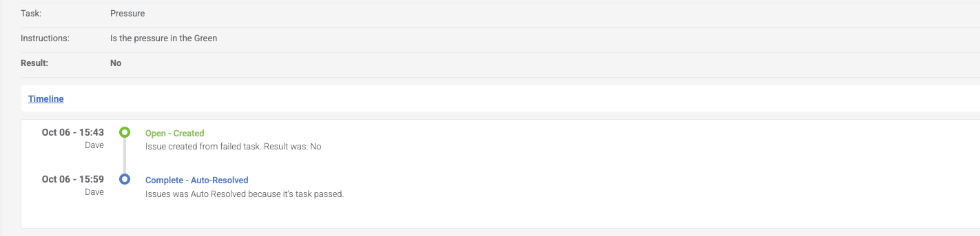
A failed check opens an issue on the spot, tied to the asset and carrying the photo and notes. It moves from open to in progress to resolved, and closes itself when the same check passes later.
Fire, Critical Alerts, Vehicle Readiness, Patrol
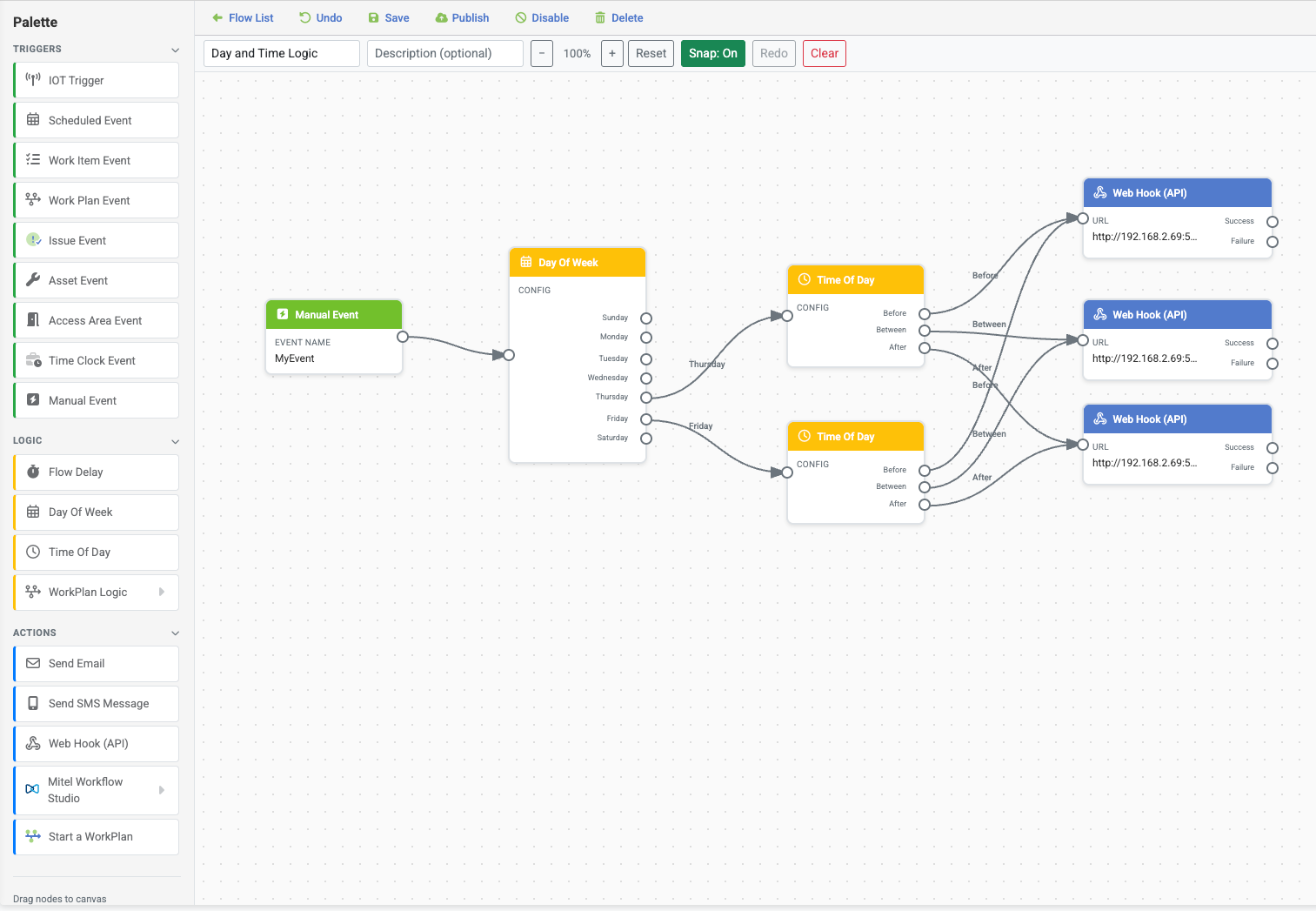
Decide what happens next by connecting a trigger to actions, with no code. A failed task, a sensor alarm, a clock-in or a schedule can send a text, an email, a Mitel message or a webhook, or start a checklist for a team.
Fire, Critical Alerts, Vehicle Readiness, Presence & Time, Patrol
Sensors from LoRaWAN, Monnit, Swift Sensors and MQTT devices. Voice and messaging through Mitel. Webhooks that pass events to your maintenance, ticketing and reporting systems, and API access for approved applications.
Critical Alerts, Presence & Time
The dashboard updates as work is started, completed and failed, and as sensors raise alarms. Boards show who's on shift and live sensor readings without anyone pressing refresh.
Fire, Critical Alerts, Presence & Time, Patrol
Every inspection, visit and shift is kept with who did it, when, where, every answer and the photos. Reports open on screen and export to Excel for auditors, insurers and payroll.
Used by every solution
One model of your sites: buildings, levels, locations, places and the assets in them, each with its own tag. People belong to groups, and permissions decide what each person can see and do, site by site.
Used by every solution
Places and their tags are shared by every solution, so the tag on a mechanical room door can do several jobs at once. Add a new solution and it works with the places, tags, people and groups you've already set up.
Mechanical room B2
NFC tag MR-B2
Command Center is software as a service, run for you, across as many sites as you operate.
Digitize recurring fire-safety inspections, catch deficiencies immediately, trigger corrective action, and keep audit-ready proof.
Read moreConnect sensor/system alerts to the right frontline response so issues are acted on, escalated and tracked through resolution.
Read moreGo beyond visitor check-in to track where contractors are working, what they are doing, what they found, and when they leave.
Read moreKnow where high-value shared equipment is, who has it, its condition and whether it is ready to use.
Read moreCoordinate the people, spaces, equipment and cross-department work required to get a facility ready for an event.
Read moreManage recurring care and readiness checks for operational and departmental equipment that often falls outside the CMMS.
Read moreMake pre-use inspections actionable so failed checks trigger immediate response before the vehicle or equipment goes into service.
Read moreUse employee arrival and presence as an operational signal to trigger procedures, track who is onsite and support lone-worker safety.
Read moreReplace paper cleaning logs with verified digital readiness checks, automatic public service visibility and easy occupant issue reporting.
Read moreVerified rounds, live progress and late-checkpoint alerts.
Read moreCommand Center is an operations platform for facilities, safety and security teams. It guides frontline work at the place it happens, proves it was done with NFC, acts on anything that's wrong, and keeps the record. Fire inspections, sensor alarms, patrols, vendor visits, time clock and vehicle checks all run on it.
No. Most customers start with one, such as fire extinguisher inspections or vendor visits, and add others later. Each new solution uses the places, tags, people and groups you've already set up.
An iPhone or Android phone with NFC, running the Command Center app. Vendors and contractors use any phone browser. Managers use the web portal.
Yes. Flows can send events to your maintenance, ticketing and reporting systems by webhook, alerts can go through Mitel, sensors connect through LoRaWAN, Monnit, Swift Sensors and MQTT, and approved applications can use the API.
Yes. Each building, campus or region can be its own site, with its own places and assets, and people can work across the sites they have access to.
In 30 minutes we'll show you the platform through the solution that matters most to you, and how the next one builds on it.
Book a demoSuite 202, 308 Legget Drive
Kanata, Ontario K2K 1Y6